
Task
Our own PrintSide project needed personalization to become part of the purchase flow. Customers should be able to choose branding options themselves and submit a structured configuration instead of explaining every requirement in an open-ended conversation.
Solution
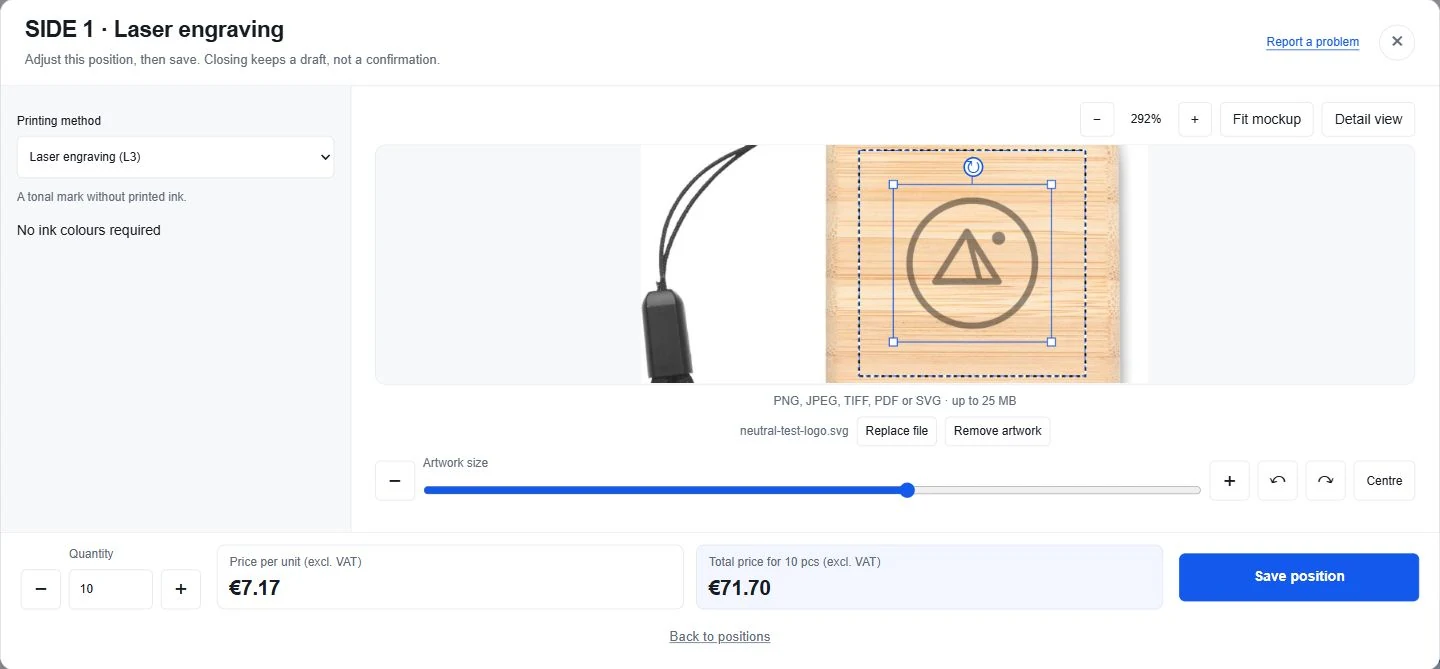
We developed an online branded product customizer connected to the store’s catalog and purchase flow. Customers select available print areas and methods, upload a logo, adjust its placement and see a preliminary representation of the result.
Selected options, files and the configuration are saved and linked to the product for subsequent order processing.
Implemented Capabilities
- Product, available print area and method selection.
- Uploading customer artwork or a logo.
- Visual placement on the product with a preliminary preview.
- Quantity and personalization option selection.
- Saving files, previews and configurations.
- Linking the configuration to the cart and subsequent order processing.
- Working with data from different suppliers.
The preliminary preview helps assess placement, but it does not guarantee accurate physical dimensions or production-ready artwork. A separate check is required.
Demonstration
Product → Print area → Method → Logo upload → Placement → Cart configuration.
The workflow can be shown using a neutral test logo without placing a real order. Actual customer files and logos are not used without permission.
The customizer forms part of PrintSide’s purchase flow; the bespoke theme and other store capabilities are covered in a separate case study.
Discuss a Similar Project
We can discuss a similar customizer: products and supplier data, available branding methods, file handling and carrying configuration details into orders.